Picture this. A customer in Chennai orders a ₹799 face serum from your site, and your only warehouse is in Gurugram.
The parcel crosses the country, lands in a higher courier zone and reaches her in five days. By then she has bought a similar serum on a quick commerce app. Sometimes the parcel comes back as RTO, too.
Now multiply that by a few thousand orders a month. That is the quiet tax many growing D2C brands pay for shipping everything from one place.
Multi-warehouse order routing is how brands stop paying it. You hold stock in two or more locations, and every order is sent to the warehouse that can ship it fastest and cheapest, automatically.
It sounds simple. In practice it raises real questions:
- When does a second warehouse actually pay for itself?
- Which SKUs should sit where?
- What rules should decide which warehouse ships an order?
- How do you avoid split shipments, wrong delivery dates and GST trouble?
This guide answers each one, with a worked cost example and a routing rule template you can adapt. It is written for brands doing roughly 1,000 or more orders a month, and for the ops teams who live with the results.
What Is Multi-Warehouse Order Routing?
Multi-warehouse order routing is the automatic choice of which warehouse ships each order. The decision happens in seconds, usually inside your order management system (OMS), and it uses live data rather than someone’s gut feel.
Think of it like a cab app. When you book a ride, the app doesn’t send the first driver on its list. It sends the nearest driver who is free and can reach you fastest. Order routing does the same thing with your warehouses.
Order routing vs order allocation
You will hear both terms, sometimes in the same meeting. They overlap, but they are not identical:
- Order routing picks the location. Which warehouse, fulfilment centre (FC) or dark store ships this order?
- Order allocation reserves the stock. Which exact units at that location are held for this order?
Some platforms call the first step “facility allocation”. Enterprise tools may call the whole thing “order orchestration”. The idea is the same: the right stock, from the right place, for every order.
Routing is not the same as courier allocation
This is where many teams get confused. Courier allocation decides which courier partner carries the parcel. Warehouse routing decides where the parcel starts.
The two decisions are linked. A courier that is cheap from Gurugram may be slow from Bengaluru, so the best setups make the warehouse choice first and then pick a courier for that lane. If courier choice is your current pain point, our guide on smart courier allocation to reduce RTO covers that side in depth.
How Courier Zones Decide Your Shipping Bill
Why does warehouse location matter so much in India? Because couriers price by distance, and they group distance into zones.
Most platforms use five zones:
| Zone | What it covers | Example lane |
|---|---|---|
| Zone A | Same city | Gurugram to Delhi |
| Zone B | Same state or a nearby region | Mumbai to Pune |
| Zone C | Metro to metro | Delhi to Hyderabad |
| Zone D | Rest of India | Delhi to Coimbatore |
| Zone E | North East and Jammu & Kashmir (special zone) | Delhi to Guwahati |
The higher the zone, the higher the rate for the same parcel. Transit time usually climbs with it.
There is a catch, though. Each courier draws its zones slightly differently. One pincode can be Zone C for one partner and Zone D for another. So your real cost depends on the lane, the courier and the weight slab together. Our explainer on courier zones in India breaks down how those differences show up on an invoice.
Why one warehouse gets expensive
If everything ships from North India, a large share of your orders lands in Zone C and Zone D by default. South and East India customers almost never get Zone A or B rates.
On top of the base rate, far-zone parcels attract more of the extras:
- Fuel surcharges that scale with freight
- COD handling fees on every cash order
- Out-of-delivery-area (ODA) charges for remote pincodes
- Higher RTO exposure, since slower deliveries get refused more often
These add-ons are easy to miss in a rate card. It is worth reading up on the hidden shipping surcharges D2C brands pay before you model any savings.
When Does a Second Warehouse Pay Off?
Here’s the honest answer: freight savings alone rarely justify a second warehouse. Speed, lower RTO and better conversion usually tip the decision. Let’s walk through an example to see why.
A worked example (illustrative numbers)
Say you are a skincare brand in Gurugram shipping 6,000 orders a month. Most parcels are under 500 g. We will use simple, made-up zone rates to keep the maths readable. Swap in your own rate card later.
| Zone | Rate per 500 g | Order mix: Gurugram only | Order mix: Gurugram + Bengaluru |
|---|---|---|---|
| A | ₹30 | 5% | 12% |
| B | ₹38 | 10% | 23% |
| C | ₹48 | 45% | 30% |
| D | ₹58 | 35% | 30% |
| E | ₹72 | 5% | 5% |
| Blended cost per order | ≈ ₹51 | ≈ ₹48 |
Adding a Bengaluru node pulls many South India orders into Zone A and B. The blended rate drops by about ₹3 per order, or roughly ₹18,000 a month.
That is useful, but a second warehouse costs more than ₹18,000 a month once you add rent, staff and software. So where does the rest of the value come from?
- Fewer RTOs. Suppose faster delivery cuts your RTO rate by 3 points. That is 180 fewer failed orders. At about ₹150 lost per RTO in two-way freight and handling, you save ₹27,000.
- Higher conversion. A shorter delivery promise on the product page lifts orders. Ekart has said one fashion brand saw demand rise 33% after a one-to-two-day faster delivery promise in North India.
- Less COD friction. Customers who wait less are less likely to change their mind at the door.
Add these together and the case starts to make sense, especially as volumes grow. To get the inputs right, first work out your true shipping cost per order, including surcharges and RTO losses.
A simple break-even check
Use this rule of thumb:
(Saving per order × monthly orders) + RTO savings + extra margin from conversion > second warehouse fixed cost + extra inventory carrying cost
Signals you’ve outgrown one warehouse
You don’t need a revenue milestone. Watch your data instead:
- More than 30–40% of orders go to one far region, such as the South or the East
- Delivery-time complaints cluster in the same states
- RTO rates in Zone D are clearly higher than in Zones A and B
- Your warehouse misses the dispatch cut-off on sale days
- Competitors in your category promise next-day delivery and you can’t
Two or more of these together is a strong signal. One alone may just mean your current warehouse needs better slotting or a later cut-off.
Where to Place Inventory Across Warehouses
Routing can only send an order to a warehouse that has the stock. So inventory placement is half the job. Get it wrong and your smart rules keep falling back to the far warehouse anyway.
Start with where your orders go
Pull the last 90 days of orders and group them by state or pincode cluster. Most brands find that three or four clusters drive the bulk of demand. A common Indian setup looks like this:
- North hub: Gurugram or Delhi NCR, serving North and parts of Central India
- West hub: Bhiwandi near Mumbai, serving Maharashtra and Gujarat
- South hub: Bengaluru, serving Karnataka, Tamil Nadu, Kerala and Telangana
- East hub (later): Kolkata, for East and a faster path to the North East
Don’t split every SKU evenly
This is a common early mistake. Not every product deserves a place in every warehouse.
- Fast movers (your top 20% of SKUs) go everywhere. They drive most orders.
- Slow movers stay in one central warehouse. Splitting them just creates stock-outs on both sides.
- Bundles and combos should sit where all their parts are stocked, or they will cause split shipments.
- Regional favourites go where they sell. A winter range may belong in the North hub only.
Rebalance on a schedule
Demand shifts. A viral reel can empty one warehouse while the other sits full. Review stock by location every two to four weeks, and well before every sale event, so festive peaks don’t catch the wrong hub short.
Also watch smaller cities. Orders from Tier 2 and Tier 3 towns are growing fast, and they are often the most expensive to serve from one hub. See our guide to shipping to Tier 2 and Tier 3 cities for what changes on those lanes.
Multi-Warehouse Order Routing Rules That Work in India
Most routing setups fail in one of two ways. Either the rules are too simple (“always ship from the nearest warehouse”), or they are so complex that nobody can explain why an order went where it did.
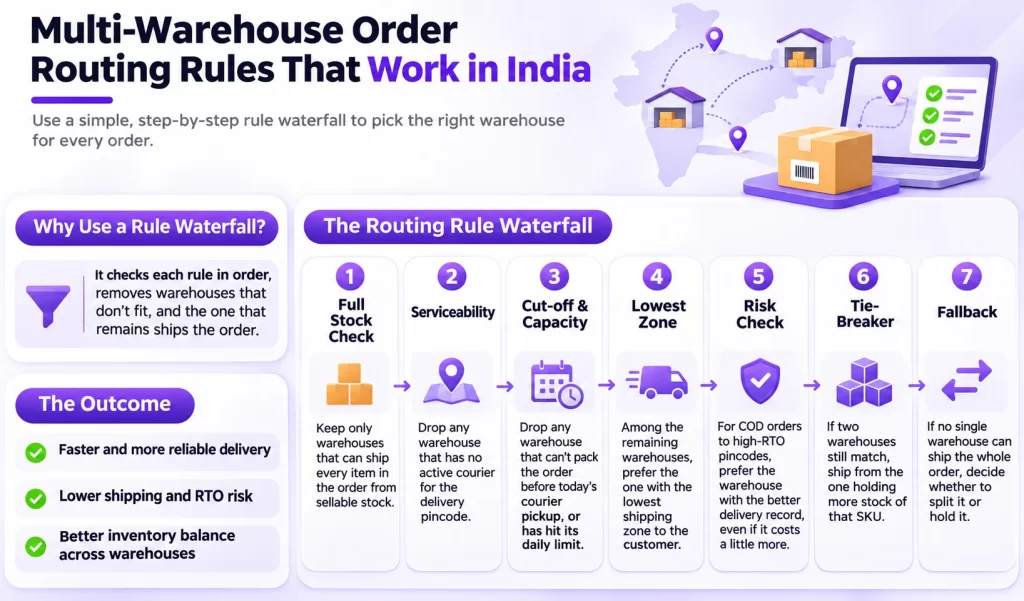
The fix is a rule waterfall. The engine checks each rule in order and drops any warehouse that fails. Whatever survives at the end ships the order.
A routing rule template you can adapt
- Full stock check. Keep only warehouses that can ship every item in the order from sellable stock. If none can, jump to step 7.
- Serviceability. Drop any warehouse that has no active courier for the delivery pincode.
- Cut-off and capacity. Drop any warehouse that can’t pack the order before today’s courier pickup, or has already hit its daily limit.
- Lowest zone. Among the remaining warehouses, prefer the one with the lowest shipping zone to the customer.
- Risk check. For COD orders to high-RTO pincodes, prefer the warehouse whose courier lane has the better delivery record, even if it costs a little more.
- Tie-breaker. If two warehouses still match, ship from the one holding more stock of that SKU. This keeps inventory balanced on its own.
- Fallback. If no single warehouse can ship the whole order, decide whether to split it or hold it (see the next section).
Write these rules down in plain words before you configure anything. If your ops lead can’t read them back in a minute, they are too complicated.
Common routing mistakes
- Counting reserved stock as available. Stock held for a marketplace or stuck in QC can’t ship today. Route on sellable stock only.
- Ignoring cut-off times. The nearest warehouse is useless if it has already missed today’s pickup. A slightly farther one that ships today often wins.
- Setting rules once and forgetting them. Courier performance changes. Review your lane data every month.
- Routing returns to the wrong place. Send returns to the nearest warehouse that stocks the SKU, so the unit becomes sellable again quickly.
Pair routing with courier choice
Once the warehouse is picked, the courier still has to be chosen for that lane. Cost, speed and first-attempt delivery rate all vary by route. Brands that link both decisions tend to see the biggest gains. Read more on why AI courier allocation matters for ecommerce brands.
Split Shipments, Next-Day Delivery and Accurate EDD
When to allow a split shipment
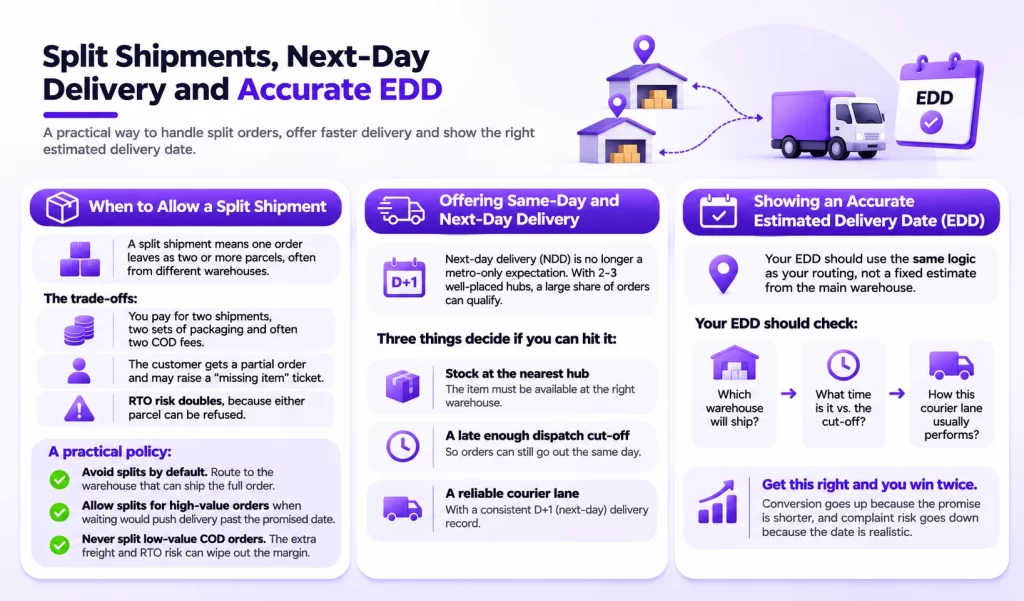
A split shipment happens when one order leaves as two or more parcels, often from different warehouses. It usually happens because no single location has every item in stock.
Splitting isn’t always bad. However, it costs more than most teams expect:
- You pay for two shipments, two sets of packaging and often two COD fees
- The customer gets a partial order and may raise a “missing item” ticket
- RTO risk doubles, because either parcel can be refused
A practical policy looks like this:
- Avoid splits by default. Route to the warehouse that can ship the full order, even if it is one zone farther.
- Allow splits for high-value orders when waiting would push delivery past the promised date.
- Never split low-value COD orders. The extra freight and RTO risk can wipe out the margin.
Offering same-day and next-day delivery
Next-day delivery (NDD, or D+1) is no longer a metro-only expectation. Quick commerce has reset what shoppers consider fast, even for planned purchases.
With one warehouse, you can only promise NDD to nearby pincodes. With two or three well-placed hubs, a large share of your orders can qualify. Three things decide whether you hit it:
- Stock of that SKU at the nearest hub
- A late enough dispatch cut-off at that hub
- A courier lane with a reliable D+1 record
Showing an accurate estimated delivery date (EDD)
Here is where many multi-warehouse brands slip. Their product page shows one fixed delivery estimate, usually based on the main warehouse. So a Bengaluru customer sees “5–7 days” even when the Bengaluru hub could deliver tomorrow.
Your EDD should use the same logic as your routing. It should check which warehouse would ship to this pincode, what time it is versus the cut-off, and how that courier lane usually performs.
Get this right and you win twice. Conversion goes up because the promise is shorter, and complaints go down because the promise is kept. Our guide on how an AI-based estimated delivery date can boost conversions explains how this works in practice.
Moving Stock Between Warehouses: GST and E-Way Bills
Rebalancing inventory means moving stock between your own warehouses. It isn’t a sale, but it still has paperwork. Many brands only discover this when a truck gets stopped.
The basics to know:
- A warehouse in the same state is usually added to your GST registration as an additional place of business.
- A warehouse in another state generally needs its own GST registration. A transfer between two GSTINs is treated as a supply, so GST applies even though you are only moving your own stock.
- An e-way bill is generally required when the consignment value crosses ₹50,000, and that includes stock transfers between branches. Tally’s e-way bill guide explains the rules and exceptions clearly.
Why does this matter for routing? Because every transfer has a cost in freight, time and compliance work. Good placement reduces how often you need to rebalance, which keeps both costs and paperwork down.
Always confirm your setup with your CA. Rules and thresholds can change, and they depend on your registrations.
OMS vs WMS: What Software Does Multi-Warehouse Fulfilment Need?
You can’t run multi-warehouse fulfilment on spreadsheets for long. At 50 orders a day, manual routing is tiring. At 500, it breaks. But which system does what?
| Order management system (OMS) | Warehouse management system (WMS) | |
|---|---|---|
| Main job | Decides what happens to each order | Runs what happens inside each warehouse |
| Routing role | Applies the routing rules and picks the warehouse | Supplies accurate, live stock and capacity for each location |
| Key features | Channel sync, routing rules, split and merge, order status | Bin-level stock, picking and packing, cut-off tracking, stock transfers |
| Without it | Orders go to the wrong place, or to one place only | Routing decides on wrong stock numbers, so orders get stuck |
Here is the part that often gets missed. Your routing is only as good as your stock data. If the WMS says Bengaluru has 40 units but only 32 are actually on the shelf, the OMS will route orders that can’t be picked. Those orders then get rerouted, delayed or split.
So when you evaluate software, look for:
- Real-time inventory sync across every warehouse and sales channel
- Sellable vs reserved stock tracked separately at each location
- Configurable routing rules your team can read and change without a developer
- Cut-off and capacity awareness, so routing respects what each warehouse can ship today
- Stock transfer workflows with the right documents for moves between warehouses
- Courier and EDD integration, so the promise at checkout matches the routing decision
If you outsource to a 3PL, much of this comes bundled with their network. If you run your own second warehouse, you need a WMS that talks cleanly to your OMS and shipping stack. That second path is where most growing brands end up, because it keeps control of stock, data and costs in-house.
Conclusion: Move Stock Closer, Then Let the Rules Do the Work
Shipping everything from one warehouse feels simple. But as orders spread across India, that simplicity shows up as higher zone costs, slower deliveries and more RTOs.
Multi-warehouse order routing fixes this in a clear sequence:
- Know your zones. Distance is the biggest driver of your shipping bill.
- Do the maths honestly. Freight savings matter, but RTO and conversion gains usually decide the case.
- Place inventory with intent. Fast movers go everywhere, slow movers stay central, and bundles stay together.
- Route with a clear rule waterfall. Check stock, serviceability, cut-off, zone and risk, in that order.
- Keep promises accurate. Your EDD should follow the same logic as your routing.
- Get the data right. Routing is only as reliable as the live stock your WMS reports.
You don’t have to build all of this at once. Start by mapping where your orders go and what each zone really costs you. The right second warehouse often becomes obvious from there.
Ready to see what multi-warehouse routing could save your brand? Book a 30-minute demo and we’ll walk through your order mix, zone costs and routing setup with you.
Frequently Asked Questions
A warehouse mainly stores goods, often in bulk, for longer periods. A fulfilment centre (FC) is built to pick, pack and ship individual customer orders quickly. For D2C brands the line is blurry, because most “warehouses” now do both jobs. In routing terms, both count as a node that can ship an order.
There is no fixed number. Some brands see value from about 3,000 to 5,000 orders a month, while others wait for 20,000 or more. Watch the signals instead: a large share of orders going to one far region, clustered delivery complaints, and higher RTO in Zone D. Then run the break-even check above.
Yes, the two terms mean nearly the same thing. Both describe holding stock across several locations closer to customers instead of in one central warehouse. You may also see “inventory distribution”, “inventory splitting” or “multi-location warehousing”. All of them rely on order routing to work well.
It often does. Faster deliveries give customers less time to change their mind, especially on COD orders. Routing can also send risky COD orders through lanes with a better delivery record. Pair it with good NDR follow-up for the best results.
Yes. Many brands run a hybrid setup, such as their own warehouse in the North and a 3PL hub in the South. The key is one system that sees stock in both places and applies the same routing rules. Use ranked locations if you want one site to ship first whenever it has stock.

Kapil Pathak is a Senior Digital Marketing Executive with over six years of experience in the logistics and supply chain industry. He specializes in SEO, SEM, and multi-channel campaign management. He has a strong track record of building strategies that boost brand visibility and generate qualified leads. His work focuses on driving growth for D2C and B2B technology companies through data-driven digital marketing initiatives.